
Does Word Count Matter for SEO? What Google Says (2026)
Google says it has no preferred word count. The limits that cut your text off are counted in characters: titles, snippets, posts and ads.
 Photo by Paul Esch-Laurent on Unsplash
No. Google doesn't rank a page higher because it has more words, and it says so in its own guidance. Length still matters in a narrower way: almost every place your words end up (a search result, a post, an ad, a video page) has a limit, and it's counted in characters, not words.
Word count and SEO: what Google says
Google's page on creating helpful, reliable, people-first content (last updated 2026-10, checked 2026-10-14) has a list of warning signs for content made for search engines instead of people. One of them reads: "Are you writing to a particular word count because you've heard or read that Google has a preferred word count?" The answer it gives right after is no, it doesn't have one.
So where did "write 2,000 words to rank" come from? A likely explanation is correlation. Pages that answer a big question well are often long, and they often collect links, so length looked like the reason. Padding a short answer to match them adds the length without the answer, and plenty of readers who scroll past three paragraphs of warm-up go back to the results.
The practical rule: write until the question is answered, then stop. If a section can go without the page losing anything, cut it.
The length limits that do matter
These are the limits that actually change what readers see. Some are hard (the platform refuses the text), some are soft (the text is accepted but cut off on screen), and one is just a convention.
Length limits for common formats
| Limit | Type | |
|---|---|---|
| Page title (Google) | None set | Soft: cut to fit the screen |
| Meta description (Google) | None set | Soft: cut to fit the screen |
| Post on X | 280 characters without Premium (a link counts as 23) | Hard |
| YouTube title | 100 characters | Hard |
| YouTube description | 5,000 characters | Hard |
| Google Ads headline | 30 characters | Hard |
| Google Ads description | 90 characters | Hard |
| Cover letter | Under one page, 3 or 4 paragraphs | Convention |
From each platform's own documentation, checked 2026-10-14. Sources are linked below.
The two Google rows surprise people. Google's docs on title links say there's no limit on how long the HTML title element can be, and its snippet docs say the same about meta descriptions. Both get truncated in results "as needed, typically to fit the device width". That means the cut point moves between a phone and a laptop, so no character count is safe everywhere. Put the words that matter at the start.
Google does ask for "descriptive and concise" titles and warns against "unnecessarily long or verbose" ones, so a short title is still the better title. Google doesn't publish a cut-off, so a few extra characters only risk being truncated.
- X counts characters with weights. Per X's counting rules, every link counts as 23 whatever its length, every emoji counts as 2, and Chinese, Japanese and Korean characters count as 2 each, so a post in those scripts tops out at 140 characters. Premium subscribers get a much higher cap (X Help); the weights still apply.
- YouTube's 100 and 5,000 limits come from its Edit video details help page.
- Google Ads responsive search ads allow 30 characters per headline, 90 per description and 15 per display path, and characters in double-width languages count as 2 (Google Ads Help).
- Cover letters have no platform limit, which is exactly why they run long. Northeastern University's career guide describes three or four paragraphs and "always less than a page"; Columbia's cover letter guidelines say one page.
How to check a draft against a limit
Paste the draft into the Word Counter and read two boxes: Characters (spaces included, the way X's counting rules treat them) and Words. It updates as you type, so you can trim a title until it fits without copying it back and forth. The text stays in your browser; nothing is sent anywhere.
As a test, we pasted in the meta description of this very article:
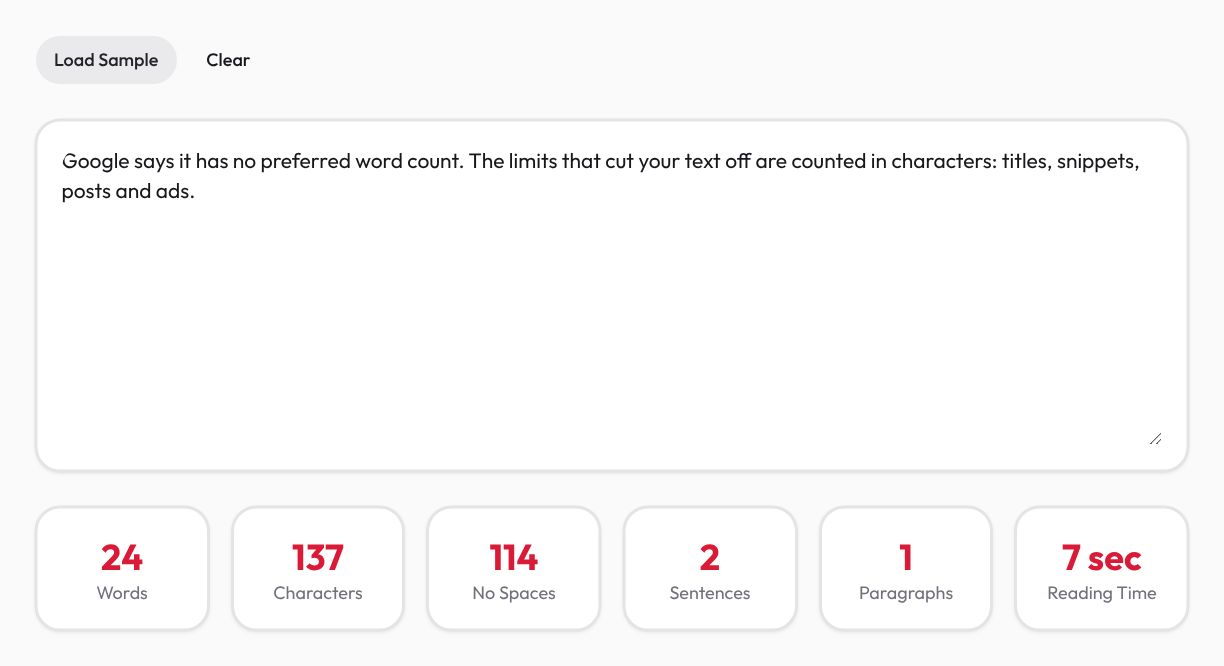
For X, the counter gives you an upper bound, not X's number: a 60-character link in your draft only costs 23 once posted, and an emoji costs 2. For Google Ads, the counter is most useful early, while you're still writing ten headline variations in a document and want to see which ones fit 30 characters.
Why two word counters give different numbers
Every counter has to decide what a word and a character are, and they don't all decide the same way. Ours treats anything between spaces or line breaks as one word, and counts characters the way JavaScript measures a string. These four short inputs show where that leads:
Same text, as the Word Counter counts it
Text
state-of-the-art
Words
1
Characters
16
Sentences
1
Text
Hello 👋 world
Words
3
Characters
14
Sentences
1
Text
你好世界,今天天气很好。
Words
1
Characters
12
Sentences
1
Text
Dr. Smith arrived. He left.
Words
5
Characters
27
Sentences
3
Counted with the Word Counter's own code on 2026-10-14.
Calculated with the same logic as our Word Counter.
- "state-of-the-art" is 1 word and 16 characters here. A counter that splits on hyphens would say 4 words. Neither is wrong; just use the same counter for the whole job.
- The wave emoji counts as 2 characters, because JavaScript stores it as two code units. X happens to charge 2 for every emoji too, but a site that counts what you see on screen would say 13, not 14.
- Chinese doesn't put spaces between words, so the whole sentence is 1 "word". Go by characters for Chinese, Japanese and Korean.
- Our sentence count treats every full stop as an ending, so "Dr." starts a new sentence and the last line shows 3 sentences instead of 2. Fine as a rough guide; it isn't a grammar check, and none of this matters much until you're three characters over a hard limit and two tools disagree.
When to count words instead of characters
Word limits live mostly outside the web: school essays, application forms, grant proposals, journal abstracts. The institution sets the number and also decides how it counts, so check whether titles, references and footnotes are included before you start cutting. When the form gives no rule, count the way its own text box does.
Reading time is the other place word count is useful. The Word Counter assumes 200 words per minute, the same rate this blog's style guide uses. If an internal update comes out at nine minutes, I'd expect most people to skim it, and that's a better reason to cut than any SEO rule.
Once the length is right, the capitalization of the title is the next thing people argue about. The guide to text case compares AP and Chicago headline styles side by side.
Mahdi Moradi
Full-stack software engineer and founder of Bornara AI, building free privacy-first tools at ZipTools. Based in Calgary, Canada.
Try the tool mentioned in this article.
Open word counterRelated articles

camelCase, snake_case, kebab-case: Which Case Goes Where
One phrase in all 12 text cases, then where each is required: Python and JavaScript names, environment variables, URL slugs, and AP vs Chicago headlines.