
Gemini Token Counter Online: Tokens, Cost and Accuracy
Count Gemini tokens in your browser, see how close the estimate gets to Google’s countTokens on 16 texts, and what a prompt costs on Gemini Pro and Flash.

To count Gemini tokens without sending your text anywhere, paste it into the Token Counter and read the four Gemini rows. The number you get is an estimate, because Google doesn’t publish the tokenizer behind Gemini. We checked how good that estimate is against Google’s own countTokens API on 16 texts: it was off by 6.8% on average.
We also found a promising shortcut along the way. Google’s open-weight Gemma 4 tokenizer, which does run in the browser, landed exactly one token below Google’s count on every one of those 16 texts. We don’t know why it’s one token, and we only tested plain text. Below: how to count, how far to trust each number, and what Gemini charges per token.
How to count Gemini tokens online
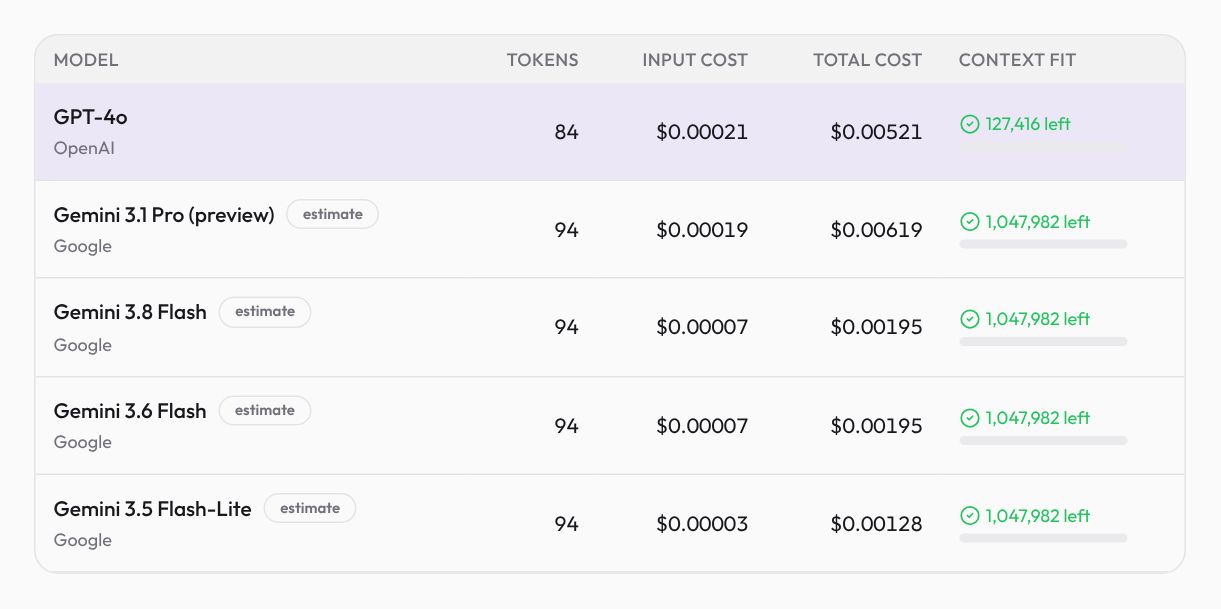
Open the Token Counter, paste your prompt and look at the Google rows: Gemini 3.1 Pro (preview), Gemini 3.8 Flash, Gemini 3.6 Flash and Gemini 3.5 Flash-Lite. The four rows always agree on the count, so read any one of them for tokens, input cost, cost with the reply you reserve, and context left out of 1,048,576. Counting happens in your browser.
With the tool’s built-in sample (a 363-character support-email prompt) and 500 output tokens reserved, all four Gemini rows read 94 tokens with an “estimate” badge. GPT-4o reads 84 with no badge, since OpenAI publishes that tokenizer. Google’s countTokens API, asked on 2026-11-02, said 93.
Why the Gemini count is an estimate, and how close it gets
Google hasn’t released the one Gemini uses, so the Token Counter starts from OpenAI’s public o200k_base encoding and corrects it with factors we fitted against Google’s exact counts: Latin-script text (English, code, Spanish) gets one factor, and scripts such as Persian, Chinese and Japanese get another.
To see how well that holds up, we sent our 16-text calibration set to countTokens for all four Gemini models. The four models returned identical counts on every text, which is why the tool uses one calibration for all four. The table puts Google’s count next to two things you can get in a browser: the Token Counter’s estimate, and the Gemma 4 tokenizer.
Google’s exact Gemini count vs the two ways to count in a browser
| Exact count | Gemma 4 31B tokenizer | ZipTools estimate | Estimate off by | |
|---|---|---|---|---|
| Hello line (13 characters) | 4 | 3 | 4 | 0% |
| Support prompt (363 characters) | 93 | 92 | 94 | +1% |
| System prompt (243 characters) | 58 | 57 | 60 | +3% |
| Long report (3,253 characters) | 615 | 614 | 668 | +9% |
| Python (381 characters) | 141 | 140 | 127 | −10% |
| TypeScript (367 characters) | 108 | 107 | 99 | −8% |
| JSON tool schema (282 characters) | 77 | 76 | 74 | −4% |
| Markdown notes (273 characters) | 90 | 89 | 93 | +3% |
| Numbers and IDs (190 characters) | 106 | 105 | 92 | −13% |
| Spanish email (263 characters) | 67 | 66 | 70 | +4% |
| German request (201 characters) | 45 | 44 | 45 | 0% |
| Persian (174 characters) | 65 | 64 | 66 | +2% |
| Chinese (77 characters) | 54 | 53 | 48 | −11% |
| Japanese (95 characters) | 52 | 51 | 56 | +8% |
| Emoji post (152 characters) | 37 | 36 | 44 | +19% |
| URL log (173 characters) | 87 | 86 | 75 | −14% |
Exact counts from Google’s countTokens API for Gemini 3.1 Pro, 3.8 Flash, 3.6 Flash and 3.5 Flash-Lite (identical on all 16 texts), measured 2026-11-02. Gemma 4 counted in the browser with the tokenizer the Token Counter loads for Gemma 4 31B. Estimate off by: the Token Counter estimate compared with the exact count.
Calculated with the same logic as our Token Counter & Cost Calculator: GPT, Claude, Gemini, DeepSeek and more.
On ordinary prompts the estimate is fine: within 4% on the support prompt, the system prompt, the JSON schema and the Spanish, German and Persian texts. It struggles with text full of symbols and digits. The estimate came in 13% low on a line of revenue figures and order IDs, 14% low on a URL log and 10% low on Python. It ran 19% high on an emoji-heavy post. Long English prose ran 9% high (668 against 615 on the 3,253-character report), and Chinese came in 11% low. If your prompt is mostly code or data, leave a margin of 15% or so.
The Gemma 4 column is the surprise. Gemma is Google’s open-weight model family, and its tokenizer is public, so the Token Counter can run it in your browser. On all 16 texts it came out exactly one token below Google’s count, so “Gemma 4 plus one” reproduced the Gemini number every time. We only measured plain text, on one day, and Google doesn’t promise the two will stay in step. Even without the plus one, raw Gemma was closer than the estimate on 12 of the 16 texts.
Corpus: the Token Counter’s 16 calibration texts (prose, prompts, Python, TypeScript, JSON, Markdown, numbers, Spanish, German, Persian, Chinese, Japanese, emoji, a URL log), all written for ZipTools. Exact counts: Google’s countTokens API for the four Gemini models, each text sent as one user message, on 2026-11-02. Browser counts: the Token Counter’s Gemini estimate and its Gemma 4 31B tokenizer, computed from the same texts.
Getting an exact Gemini token count
- In the Token Counter, without sending anything. Pick Gemma 4 31B in the model menu. The page loads Gemma’s tokenizer once, the tokens box switches to “exact”, and you add one. That matched Google on all 16 of our plain-text samples (one day’s test; we haven’t tried images, files or system instructions).
- In the Token Counter, from Google. Pick a Gemini model and turn on Exact Google count. The tool sends your text to Google’s countTokens endpoint through ziptools.dev and shows the number Google returns. It’s off by default, because this is the one path where your text leaves the browser.
- In your own code, call countTokens (POST /v1beta/models/{model}:countTokens in the Gemini API) on the full request before you send it. Afterwards, promptTokenCount in each response’s usageMetadata is the input count you are billed for; the reply and any thinking tokens are counted separately.
Google’s token guide (checked 2026-10) suggests a rough rule: a token is about 4 characters. Our support prompt fits it (363 characters for 93 tokens, 3.9 per token), and the long English report does better, at 5.3. Code and data don’t: Python came to 2.7 characters per token, the URL log to 2.0 and the Chinese text to 1.4. The rule works for English prose. For code, data or Chinese, count instead.
Gemini vs GPT, Grok and Claude on the same text
Token counts aren’t portable between providers, and that matters when you compare prices. Across the whole 16-text set, Gemini needs 1,699 tokens. That is about 8% more than GPT-4o and close to GPT-6.1 Sol and Grok 4.7, but about 36% fewer than Claude Opus 5.5.
Exact tokens for the same 16 texts, by model
| Value | |
|---|---|
| Gemini (all four models) | 1,699 tokens |
| GPT-4o (o200k_base) | 1,567 tokens |
| GPT-6.1 Sol | 1,663 tokens |
| Grok 4.7 | 1,623 tokens |
| Claude Haiku 4.5 | 2,051 tokens |
| Claude Opus 5.5 | 2,647 tokens |
All counts exact. GPT-4o counted locally with o200k_base on the raw text; the others from each provider’s counting API (2026-11-02), which adds a few tokens per message for wrapping (about 11 per text on Claude Opus 5.5, under 1 on Gemini).
Calculated with the same logic as our Token Counter & Cost Calculator: GPT, Claude, Gemini, DeepSeek and more.
Even after you take off Claude’s per-message wrapping, the gap stays wide. A Claude price per million tokens buys less text than the same Gemini price. The Claude token counter guide explains why Claude’s newer tokenizer runs high.
What a Gemini prompt costs
Per million tokens, Google’s Gemini API pricing page (paid tier, standard rates, checked 2026-10-12) lists Gemini 3.1 Pro (preview) at $2 input and $12 output for prompts up to 200,000 tokens, and $4 and $18 above that. Gemini 3.8 Flash and 3.6 Flash cost $0.75 and $3.75 through 2026-12-31, rising to $1.50 and $7.50 from 2027-01-01. Gemini 3.5 Flash-Lite costs $0.30 and $2.50.
With the sample prompt and a 500-token reply, the reply is nearly the whole bill: $0.00619 per call on 3.1 Pro, of which the prompt is $0.00019. The same call costs $0.00195 on either Flash and $0.00128 on Flash-Lite. At these sizes I wouldn’t bother trimming the prompt; cap the reply instead. Gemini’s thinking also counts here: Google bills a model’s reasoning tokens as output, so a reply can cost more than the visible text suggests. Check thoughtsTokenCount in the response’s usageMetadata to see how much.
Space is rarely the issue. All four models have a 1,048,576-token context window, and the sample leaves 1,047,982 free on the estimate. How much a big window is really worth is in context windows explained. The price tier is the limit that catches people: past 200,000 prompt tokens, every token of a 3.1 Pro request bills at the higher rate. For a whole month of traffic rather than one call, the LLM Cost Calculator runs the same math across models.
Mahdi Moradi
Full-stack software engineer and founder of Bornara AI, building free privacy-first tools at ZipTools. Based in Calgary, Canada.
Try the tool mentioned in this article.
Open token counterRelated articles

How AI Background Removal Works — The Technology Behind Instant Cutouts
Neural networks can separate foreground from background in seconds. Here's how the technology works, why client-side processing matters, and how to get the best results.

WebP vs AVIF vs PNG vs JPEG: Which Format to Use (Tested)
We ran a real photo and a screenshot through every format and quality level. WebP won both, PNG grew, and AVIF needs more than a browser to make.

How AI Reads Your Text: Tokens, Costs, and Context Windows Explained
Language models do not read words — they read tokens. Understanding tokens is the key to predicting what an AI request will cost and whether your prompt will even fit. Here is how it works, in plain English.