
JSON Validation Errors: Unexpected Token, Trailing Comma & Fixes
What "Unexpected token", "Expected double-quoted property name" and other JSON errors mean, with the real message and a fix for each one.
 Photo by Pankaj Patel on Unsplash
A JSON parser stops at the first character it can't accept and tells you what it expected instead. The message usually sounds cryptic, but it points at one of a handful of mistakes: text that isn't JSON at all (an HTML error page), a JavaScript object or Python dict that only looks like JSON, a trailing comma, a value JSON has no word for, or a file that got cut off.
Below is each mistake with the exact message you get, and the fix. Every message comes from our JSON Formatter's own validation code, which calls your browser's JSON.parse.
What valid JSON allows
RFC 8259 (the JSON standard, December 2017) says a string begins and ends with quotation marks, and those are double quotes. Every object key is a string. Commas go between members, never after the last one. The literals true, false and null must be lowercase.
JSON has no comments anywhere in its grammar. Section 6 says numbers that can't be written in the grammar, "such as Infinity and NaN", are not permitted. There is no undefined, and no single-quoted strings. Most errors come from writing something JavaScript or Python accepts and assuming JSON does too.
Common JSON errors and what each message means
Each row below is a small broken input, the error the JSON Formatter shows for it, and a version that parses. Notice how many different mistakes share one message: single quotes and unquoted keys both report "Expected property name or '}'" at line 1 column 2, because the parser only knows that a key should have started there.
Nine broken inputs, the JSON Formatter's message for each, and the fix
Broken input
<!DOCTYPE html><html><body>404 Not Found</body></html>
JSON Formatter says
Unexpected token '<', "<!DOCTYPE "... is not valid JSON
Fixed
{"error": "Not found"}
Broken input
{"id": 42, "tags": ["a", "b"],}
JSON Formatter says
Expected double-quoted property name in JSON at position 30 (line 1 column 31)
Fixed
{"id": 42, "tags": ["a", "b"]}
Broken input
{'name': 'Ada'}
JSON Formatter says
Expected property name or '}' in JSON at position 1 (line 1 column 2)
Fixed
{"name": "Ada"}
Broken input
{name: "Ada"}
JSON Formatter says
Expected property name or '}' in JSON at position 1 (line 1 column 2)
Fixed
{"name": "Ada"}
Broken input
{"score": NaN}
JSON Formatter says
Unexpected token 'N', "{"score": NaN}" is not valid JSON
Fixed
{"score": null}
Broken input
{"score": undefined}
JSON Formatter says
Unexpected token 'u', "{"score": undefined}" is not valid JSON
Fixed
{"score": null}
Broken input
{"port": 8080 // dev only }
JSON Formatter says
Expected ',' or '}' after property value in JSON at position 14 (line 1 column 15)
Fixed
{"port": 8080}
Broken input
{"user": {"id": 42, "name": "Ada"}
JSON Formatter says
Expected ',' or '}' after property value in JSON at position 34 (line 1 column 35)
Fixed
{"user": {"id": 42, "name": "Ada"}}
Broken input
[U+FEFF]{"id": 42}
JSON Formatter says
Valid JSON, with a warning: Removed U+FEFF (byte order mark) from the start of the input.
Fixed
{"id": 42}
Messages as Chrome, Edge and Node word them (all use the V8 engine). Firefox and Safari word them differently. The Fixed value in the first row is what the server should have sent. The last row shows a byte order mark as [U+FEFF] because it is invisible.
Calculated with the same logic as our JSON Formatter & Validator.
Each broken input went through the JSON Formatter's own validation code (its Format action, 2-space indent, sort keys off) on 2026-10-19, and the BOM row again on 2026-10-20 after the warning was added, in Node 22, which uses the same V8 engine as Chrome and Edge. The screenshot further down is the live tool in Chromium. Our test suite re-runs every row and fails the build if the tool's output ever stops matching this table.
"Unexpected token <": the response was an HTML page
With this one the JSON itself is rarely at fault. The full message reads Unexpected token '<', "<!DOCTYPE "... is not valid JSON, and it means the first character of the response was a less-than sign. That is an HTML page: a 404, a login redirect, a proxy error or a framework's error screen, served where your code expected an API response.
Fixing the "JSON" won't help. Check the status and content type before you parse, and log the first few hundred characters of the body when they're wrong. The real error is usually sitting right there in the HTML title.
const res = await fetch('/api/user/42');
const type = res.headers.get('content-type') ?? '';

if (!res.ok || !type.includes('json')) {
  const body = await res.text();
  throw new Error(`HTTP ${res.status} (${type}): ${body.slice(0, 200)}`);
}

const user = await res.json();
A close cousin is "Unexpected end of JSON input". That's what JSON.parse says about an empty string, which is what you get when you call res.json() on an empty body, such as a 204 No Content response.
Trailing commas: "Expected double-quoted property name"
Modern JavaScript allows a comma after the last item, so code and hand-edited configs are full of them. JSON never has. After a comma the parser expects another key, so it complains about a missing "double-quoted property name" and points at the closing brace, just past the real mistake.
In a multi-line file that means the line number is often the line after the comma. In the config below the stray comma sits on line 4, and the formatter reports line 5 column 1, where the closing brace is.
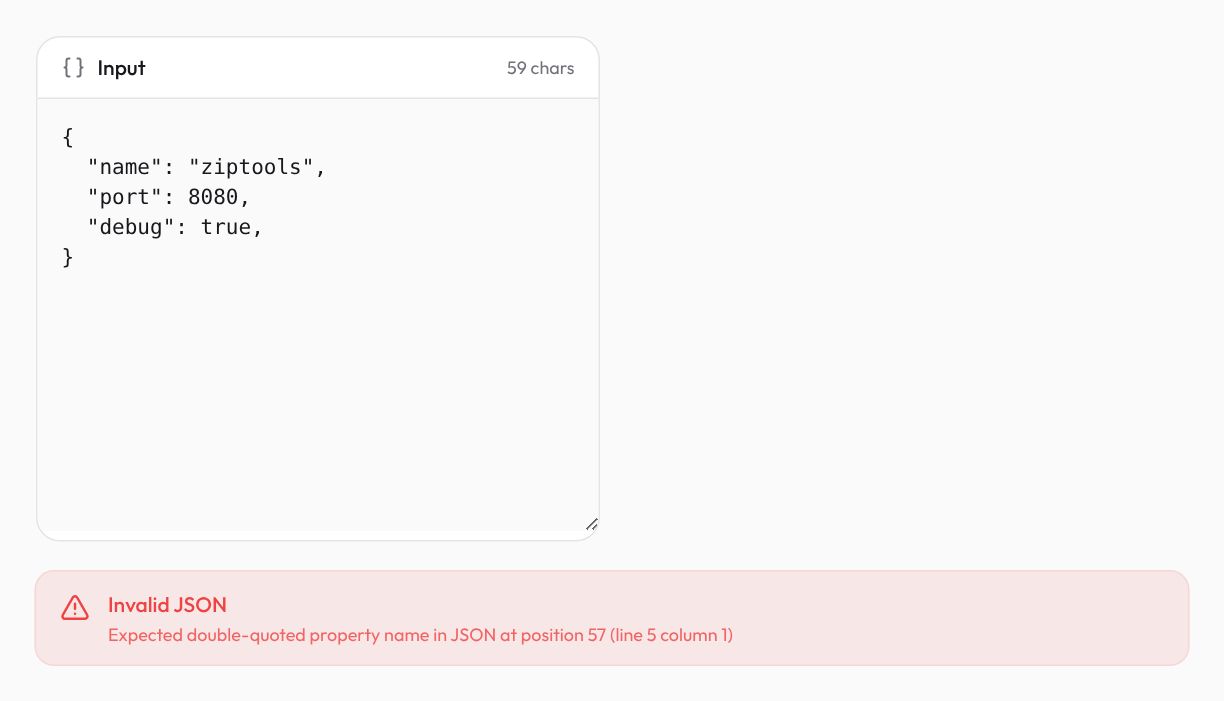
Inside an array the wording changes. ["a", "b",] gives "Unexpected token ']'" instead, because after a comma an array wants another value, not a key.
Single quotes, unquoted keys and Python dicts
"Expected property name or '}'" at line 1 column 2 almost always means the text was printed by a language, not serialized as JSON. A JavaScript object literal in a console log has unquoted keys. A Python dict printed with print() or str() uses single quotes and capitalized True, False and None, none of which JSON accepts.
Swapping quotes by hand works for a one-off, but it breaks the moment a value contains an apostrophe. Fix it at the source instead:
import json

user = {"name": "Ada", "active": True, "nickname": None}

print(user)              # {'name': 'Ada', 'active': True, 'nickname': None}  <- not JSON
print(json.dumps(user))  # {"name": "Ada", "active": true, "nickname": null}
In JavaScript the equivalent is JSON.stringify(obj) rather than copying what console.log shows you.
NaN, Infinity and undefined
These produce an "Unexpected token" message naming the first letter, 'N' or 'u'. NaN and Infinity come from arithmetic that went wrong (0/0, 1/0), undefined from a value that was never set. JSON has no words for them, so the honest replacement is null (or leaving the key out), plus a note in your API docs about what null means.
JavaScript's JSON.stringify quietly writes NaN and Infinity as null and drops keys whose value is undefined, so JavaScript rarely produces this error. Python is the usual culprit: json.dumps has allow_nan set to True by default and writes NaN, Infinity and -Infinity, which the Python json documentation itself says is not compliant with the JSON specification. Pass allow_nan=False and you get a ValueError at the source instead of a parse error somewhere downstream.
Comments and files that got cut off
A // or /* comment right after a value gives "Expected ',' or '}' after property value", pointing at the first slash. After a comma you get the trailing-comma message instead, and at the top of a file "Unexpected token '/'". Some config files look like JSON but aren't: VS Code reads settings.json, tasks.json and launch.json in a "JSON with Comments" mode that also tolerates trailing commas, according to VS Code's JSON docs. Comments are fine there. Copy that file into anything that expects strict JSON and they become errors.
A truncated document often gives the same message, positioned at the very end. In the table the input stops one closing brace short, and the parser reports column 35 of a 34-character string. When the position equals the length of your input, count your brackets: something was cut off by a log line limit, a copy from a terminal, or a stream that closed early.
The invisible one: a byte order mark
Some editors can save UTF-8 files with a byte order mark (U+FEFF), an invisible character at the very start. RFC 8259 says programs must not add one to JSON sent over a network, but lets parsers ignore it. JSON.parse doesn't ignore it. In Node 22 a file that starts with one fails with "Unexpected token" followed by a pair of single quotes that seem empty, because the character inside them is invisible. Python's json.loads raises a ValueError ("Unexpected UTF-8 BOM") on a string that starts with one, as the same Python docs describe.
The JSON Formatter trims whitespace before parsing, and JavaScript counts U+FEFF as whitespace, so it can still format the file. When we first tested it, that happened silently and the BOM row came back plain "Valid JSON", which hid the very problem you were debugging. It now formats the file and adds a warning naming the character it removed, because your own JSON.parse won't be so forgiving. To fix the file itself, save it again as plain UTF-8 without a BOM (in VS Code, click the encoding in the status bar, choose Save with Encoding, then UTF-8). In code, remove it before parsing:
import { readFileSync } from 'node:fs';

const text = readFileSync('config.json', 'utf8').replace(/^\uFEFF/, '');
const config = JSON.parse(text);
In Python, open the file with encoding="utf-8-sig", which drops a leading BOM if there is one.
Checking JSON without pasting secrets into a website
The JSON you need to debug is often the sensitive kind: an API response with tokens, a config with database passwords, a customer record. The JSON Formatter parses, formats and minifies in your browser with JSON.parse and JSON.stringify, and sends nothing anywhere. If a key did end up somewhere it shouldn't, read what to do after leaking an API key.
One limit to know: it tells you the first error only. Fix that one, press Format again, and repeat. A file with three trailing commas takes three rounds.
Mahdi Moradi
Full-stack software engineer and founder of Bornara AI, building free privacy-first tools at ZipTools. Based in Calgary, Canada.
Try the tool mentioned in this article.
Open json formatterRelated articles

How AI Background Removal Works — The Technology Behind Instant Cutouts
Neural networks can separate foreground from background in seconds. Here's how the technology works, why client-side processing matters, and how to get the best results.

WebP vs AVIF vs PNG vs JPEG: Which Format to Use (Tested)
We ran a real photo and a screenshot through every format and quality level. WebP won both, PNG grew, and AVIF needs more than a browser to make.

Claude Token Counter: Estimate Tokens and Cost Online
Count Claude tokens in your browser, see what a prompt costs on Opus, Sonnet and Haiku, and learn when you need Anthropic’s exact count instead.