
OpenAI API Cost Calculator: Estimate Your Bill Before You Build
Work out what an OpenAI API feature costs per month before you ship it: the formula, a worked example on GPT-6 and GPT-4o, and what estimates miss.
 Photo by biker_becca on Pixabay
Before an AI feature ships, someone will want to know what it costs once real customers use it. OpenAI bills per token, so the answer is arithmetic you can do before you write any production code.
Monthly cost = (input tokens × input price + output tokens × output price) × requests per day × 30. Everything below is about getting those three inputs right, because the formula is the easy part.
How an OpenAI API cost calculator works
You need three numbers. Input tokens per request is everything you send: the system prompt, the user’s message, any retrieved documents, earlier turns of the conversation and the definitions of any tools the model can call. Output tokens per request is what the model writes back. Requests per day is your traffic.
Prices are quoted per million tokens, with input and output priced separately. On OpenAI’s API pricing page (standard tier, checked 2026-10-24), GPT-6 Astra costs $10 input and $50 output, GPT-6.1 Sol $2 and $10, and GPT-6 Luna $0.10 and $0.50. The older GPT-4o and GPT-4o mini are no longer on that table; their GPT-4o and GPT-4o mini model pages list $2.50 and $10, and $0.15 and $0.60 (checked 2026-10-07). The LLM Cost Calculator holds these prices with their dates and does the multiplication for every model at once.
A worked example: a support-reply bot
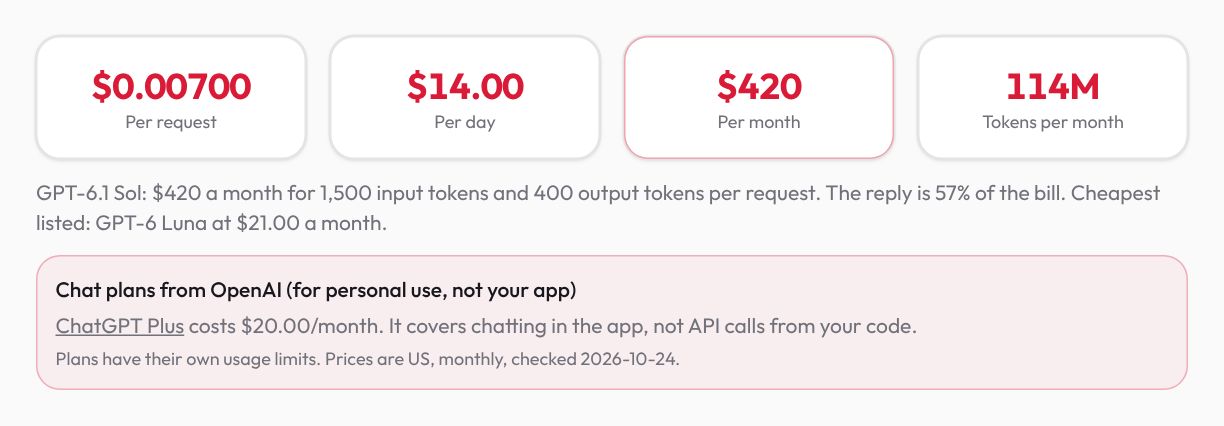
Say a small online shoe store wants the model to draft replies to support emails. Each request carries a system prompt with the store’s policies, the order details and the customer’s email: call it 1,500 input tokens. The draft reply runs to about 400 tokens. The store gets 2,000 emails a day.
On GPT-6.1 Sol that comes to $420 a month. GPT-4o, the older model, costs more for the same work, $465, because its input price is higher. GPT-6 Astra lands at $2,100, while GPT-4o mini and GPT-6 Luna both stay under $30.
Monthly cost of the support-reply example by OpenAI model
| Value | |
|---|---|
| GPT-6 Astra | $2,100 |
| GPT-6.1 Sol | $420 |
| GPT-4o | $465 |
| GPT-4o mini | $27.90 |
| GPT-6 Luna | $21.00 |
1,500 input and 400 output tokens per request, 2,000 requests a day, 30 days, standard prices as of 2026-10-07.
Calculated with the same logic as our LLM API Cost Calculator: monthly cost for GPT, Claude, Gemini and more.
The spread is the point. Astra costs 100 times what Luna does for identical traffic, so the model you pick usually moves the bill more than any prompt tweak. Whether Luna’s drafts are good enough for your customers is something only a test on real emails can tell you. At $0.00700 a request on Sol, running 200 real emails through it costs $1.40, and Luna costs less. A wrong guess costs hundreds every month.
Where the money goes
Output tokens are the expensive half. On every GPT-6 model the output rate is five times the input rate, so in the example the 400-token reply makes up 57% of the bill even though it is only about a fifth of the tokens.
Reasoning makes this sharper. OpenAI’s reasoning guide (checked 2026-10) says reasoning tokens are billed as output tokens even though the API never shows them, and it suggests reserving at least 25,000 tokens for reasoning and output when you start experimenting. If your model thinks before it answers, the output figure in your estimate is the visible reply plus the thinking. The only way to know that number is to run a few real requests and read the token usage the API reports back.
Capping the reply is often the cheapest win: a tighter output limit, or a prompt that asks for three sentences instead of a full letter. Cutting LLM API costs covers the other levers.
What makes the real bill differ from the estimate
Most estimates go wrong on input, because the request your code sends is bigger than the prompt you tested. Before trusting any number, I’d check these two:
- Conversation history. In a chat feature every turn sends the earlier turns again. OpenAI’s conversation state guide is explicit that even when you chain responses by ID, all previous input tokens in the chain are billed as input. Size the input from a late turn, not the first one.
- Function definitions and documents pulled in by search. They ride along on every call, whether the model uses them or not.
Prompt length matters too. OpenAI’s pricing page lists separate short- and long-context rates for the GPT-6 models, and the calculator uses the short-context ones, so a feature that routinely sends huge documents will cost more than it shows. Caching pushes the other way: the same page lists cached input for GPT-6.1 Sol at $0.10 per million tokens against $2 for fresh input. If every request starts with the same long system prompt, caching can shrink the input side a lot. The calculator leaves discounts out on purpose, so the number it gives you is a ceiling for standard traffic rather than a best case.
The chart and screenshot come from the LLM Cost Calculator’s own logic, which our test suite re-runs on every change, with the price list dated 2026-10-07. The GPT-6 prices were re-checked against OpenAI’s pricing page on 2026-10-24. No caching, batch or long-context rates are applied.
Is ChatGPT Plus cheaper than the API?
For a product, no, because they aren’t the same thing. OpenAI’s help center (checked 2026-10-24) puts ChatGPT Plus at $20 a month and says Plus and the API are billed separately. Plus pays for a person using the ChatGPT app; it can’t answer 2,000 customer emails from your code, so its price says nothing about this job.
Where the comparison does matter is your own use. If you are about to build a script just to chat with a model yourself, a plan may be the simpler buy, which is why the calculator lists the plans of the provider you pick, labelled for personal use. Of the plans we checked, only Claude Max includes API credit, equal to its price and claimed by linking a Claude Console account, per Anthropic’s API credits page (checked 2026-10-24).
Estimate your own bill
Open the LLM Cost Calculator, switch to Paste a prompt and paste one realistic request: the actual system prompt plus a typical user message, not a toy example. The count is exact for models whose tokenizer runs in the browser and labelled an estimate for the rest. Set the output to the reply length you have seen in testing (plus reasoning, if any) and the requests per day you expect, then compare the column of monthly costs. Nothing you paste leaves your browser.
For a single prompt’s exact count on Claude, Gemini or GPT-6, the Token Counter can ask the provider directly (opt-in, since it sends that text to the provider’s token-counting API). Once the feature is live, check the estimate against the usage page in your OpenAI dashboard after the first week. If they disagree, check input size first (history, tools, retrieved text), then reasoning tokens on the output side.
Mahdi Moradi
Full-stack software engineer and founder of Bornara AI, building free privacy-first tools at ZipTools. Based in Calgary, Canada.
Try the tool mentioned in this article.
Open llm cost calculatorRelated articles

How AI Background Removal Works — The Technology Behind Instant Cutouts
Neural networks can separate foreground from background in seconds. Here's how the technology works, why client-side processing matters, and how to get the best results.

WebP vs AVIF vs PNG vs JPEG: Which Format to Use (Tested)
We ran a real photo and a screenshot through every format and quality level. WebP won both, PNG grew, and AVIF needs more than a browser to make.

How AI Reads Your Text: Tokens, Costs, and Context Windows Explained
Language models do not read words — they read tokens. Understanding tokens is the key to predicting what an AI request will cost and whether your prompt will even fit. Here is how it works, in plain English.